Nautobot Workshop Blog Series - Part 11 - Nautobot Jobs - Creating validation jobs

Nautobot Workshop Blog Series - Part 11 - Nautobot Jobs
Writing Nautobot Jobs to Validate Network Configurations: A Ping-Based Example
Network configuration validation is critical for ensuring the reliability and correctness of your infrastructure. Nautobot allows you to write custom Jobs to automate tasks like configuration validation. In this blog post, we’ll explore how to create a Nautobot Job that validates Layer 3 (L3) network configurations by performing ping tests between connected router interfaces using Nornir and NAPALM. The example Job provided checks IP connectivity across cabled interfaces to ensure proper configuration.
Why Validate Configurations with Nautobot Jobs?
Nautobot Jobs are Python scripts that integrate seamlessly with Nautobot’s data models and can leverage external automation tools like Nornir for network tasks. By writing a Job to validate configurations, you can:
- Automate repetitive checks: Save time by programmatically verifying connectivity.
- Ensure consistency: Use Nautobot’s source of truth to drive validation logic.
- Integrate with orchestration tools: Combine Nautobot with Nornir and NAPALM for robust network automation.
- Log results: Capture detailed, structured results for auditing and troubleshooting.
Our example Job, L3NeighborPingValidationNornir, pings between directly connected router interfaces to confirm that IP addresses are configured correctly and that L3 adjacencies are operational.
Understanding the Example Job
The provided Job validates L3 connectivity by:
- Identifying cabled interfaces between routers in Nautobot.
- Extracting IPv4 (and optionally IPv6) addresses from these interfaces.
- Using Nornir and NAPALM to execute ping tests from one interface to its peer.
- Logging approximate CLI commands (e.g., Cisco IOS or Arista EOS) and structured results.
- Summarizing pass/fail outcomes for all tests.
Here’s a breakdown of the Job’s key components and how you can adapt it for your environment.
Key Features
- Flexible scoping: Filter devices by site or role to limit the validation scope.
- IPv4/IPv6 support: Test either or both IP families.
- Bidirectional testing: Optionally ping in both directions of a link.
- VRF support: Specify a VRF for pings (e.g., for management interfaces).
- Configurable parameters: Set ICMP count and timeout for ping tests.
- Structured logging: Log CLI-like commands and detailed ping results (e.g., packet loss, RTT).
Prerequisites
To use this Job, you need:
- Nautobot with the nautobot-plugin-nornir plugin installed.
- Nornir and NAPALM libraries, configured to work with your devices.
- Device credentials set up (e.g., via environment variables for nautobot-plugin-nornir).
- Nautobot data populated with:Devices with Active status.
- Interfaces with assigned IP addresses.
- Cable connections between interfaces.
- Platform details (e.g., napalm_driver set to ios, eos, etc.).
Code Walkthrough
Let’s dive into the key parts of the Job and explain how it works.
Job Definition and Inputs
The Job is defined as a subclass of nautobot.apps.jobs.Job with metadata for its name, description, and default behavior (commit_default=False to prevent unintended changes).
1
2
3
4
5
class L3NeighborPingValidationNornir(Job):
    class Meta:
        name = "L3 Neighbor Ping Validation (Nornir)"
        description = "Use Nornir to ping between directly connected routers (IPv4 and optionally IPv6); log CLI and results."
        commit_default = False
User inputs are defined using Nautobot’s Var classes:
- sites and roles: Filter devices by location or role.
- ipv6: Enable IPv6 testing.
- bidirectional: Test both directions of a link.
- vrf: Specify a VRF for pings.
- count and timeout: Configure ICMP ping parameters.
1
2
3
sites = MultiObjectVar(model=Location, query_params={"location_type": "Site"}, required=False, label="Limit to Sites")
ipv6 = BooleanVar(default=False, label="Test IPv6")
count = IntegerVar(default=3, min_value=1, max_value=20, label="ICMP Count")
Building Test Cases
The run method orchestrates the validation:
- Filter devices: Start with Active devices, optionally scoped by sites or roles.
- Identify cabled interfaces: Find interfaces with cable connections to peer interfaces.
- Extract IPs: For each interface pair, retrieve IPv4 (and optionally IPv6) addresses.
- Prevent duplicates: Use a seen_links set to avoid testing the same link twice.
- Build test cases: Create a list of ping tests per host, including source/destination IPs, interfaces, and NAPALM driver.
1
2
3
4
5
6
7
8
for iface in Interface.objects.filter(device__in=devices, enabled=True).prefetch_related("ip_addresses", "device__platform"):
    peer = getattr(iface, "connected_endpoint", None)
    if peer is None or not isinstance(peer, Interface):
        continue
    key = tuple(sorted((iface.pk, peer.pk)))
    if key in seen_links:
        continue
    seen_links.add(key)
For each valid link, the Job checks for IP addresses and builds test cases:
1
2
3
4
5
6
7
8
9
10
11
12
src_ip = self._get_ip_on_interface(iface, want_ipv6=is_v6)
dst_ip = self._get_ip_on_interface(peer, want_ipv6=is_v6)
if src_ip and dst_ip:
    tests_by_host[iface.device.name].append({
        "src_if_name": iface.name,
        "src_ip": src_ip,
        "dst_dev_name": peer.device.name,
        "dst_if_name": peer.name,
        "dst_ip": dst_ip,
        "family": "IPv6" if is_v6 else "IPv4",
        "napalm_driver": napalm_driver,
    })
CLI Approximation For visibility, the Job generates approximate CLI commands (e.g., ping vrf MGMT 10.0.0.2 source 10.0.0.1 repeat 3 timeout 2) for IOS or EOS devices:
1
2
3
4
5
6
7
8
9
10
11
12
13
14
def _approx_cli(self, napalm_driver: str | None, family: str, dest: str, source: str | None, count: int, timeout: int, vrf: str | None) -> str:
    is_v6 = family == "IPv6"
    drv = (napalm_driver or "").lower()
    parts = ["ping"]
    if is_v6:
        parts.append("ipv6")
    if vrf:
        parts.extend(["vrf", vrf])
    parts.append(dest)
    if source:
        parts.extend(["source", source])
    parts.extend(["repeat" if drv == "ios" else "count", str(count)])
    parts.extend(["timeout", str(timeout)])
    return " ".join(parts)
Nornir Integration The Job initializes Nornir with the NautobotORMInventory plugin to use Nautobot’s device data:
1
2
3
4
5
6
7
8
9
10
11
nr = InitNornir(
    logging={"enabled": False},
    runner={"options": {"num_workers": 20}},
    inventory={
        "plugin": "nautobot-inventory",
        "options": {
            "credentials_class": "nautobot_plugin_nornir.plugins.credentials.env_vars.CredentialsEnvVars",
            "queryset": devices,
        },
    },
)
It filters Nornir hosts to match the test scope and attaches test cases to each host’s data.
Executing Pings
The ping_neighbors task runs napalm_ping for each test case on a host:
1
2
3
4
5
6
7
8
9
10
11
12
13
def ping_neighbors(task: Task, icmp_count: int, per_ping_timeout: int) -> Result:
    tests_for_host = task.host.data.get("tests_for_host", [])
    for test in tests_for_host:
        desc = f"{test['family']} {task.host.name}({test['src_if_name']}) -> {test['dst_ip']} on {test['dst_dev_name']}({test['dst_if_name']})"
        kwargs = {
            "dest": test["dst_ip"],
            "source": test["src_ip"],
            "count": icmp_count,
            "timeout": per_ping_timeout,
        }
        if vrf_name:
            kwargs["vrf"] = vrf_name
        sub = task.run(name=f"PING {desc}", task=napalm_ping, **kwargs)
Results are logged with details like packet loss and RTT:
1
2
3
4
5
6
7
8
9
10
11
12
if "success" in data and isinstance(data["success"], dict):
    s = data["success"]
    self.logger.info(
        "Result: %s | sent=%s recv=%s loss=%s rtt(ms) min/avg/max=%s/%s/%s",
        desc,
        s.get("probes_sent"),
        s.get("packet_receive"),
        s.get("packet_loss"),
        s.get("rtt_min"),
        s.get("rtt_avg"),
        s.get("rtt_max"),
    )
Summarizing Results The Job aggregates results, logging each test as PASS or FAIL and raising an error if any tests fail:
1
2
3
4
5
6
7
8
9
10
11
12
13
14
15
16
17
18
19
total = 0
successes = 0
failures = 0
for host_name, multi_result in agg.items():
    for idx, sub in enumerate(subtasks):
        total += 1
        ok = False
        data = sub.result
        if isinstance(data, dict) and "success" in data:
            ok = data["success"].get("packet_loss") in (0, 0.0)
        if sub.failed or not ok:
            failures += 1
            self.logger.error(f"FAIL: {desc} - ping result: {data}")
        else:
            successes += 1
            self.logger.info(f"PASS: {desc}")
self.logger.info(f"Summary: {successes}/{total} tests passed, {failures} failed.")
if failures > 0:
    raise RuntimeError(f"{failures} ping tests failed.")
Running the Job
To run the Job in Nautobot:
- Ensure the
nautobot-plugin-nornirplugin is installed and configured. - Place the Job script in your Nautobot Jobs directory and register it:
1
register_jobs(L3NeighborPingValidationNornir)
- Access the Job via Nautobot’s UI under Jobs > Jobs.
- Select your scope (sites/roles), configure options (e.g., IPv6, VRF), and run the Job.
- Review the logs for detailed results, including CLI commands, ping outcomes, and a summary.
Example Output
1
2
3
4
5
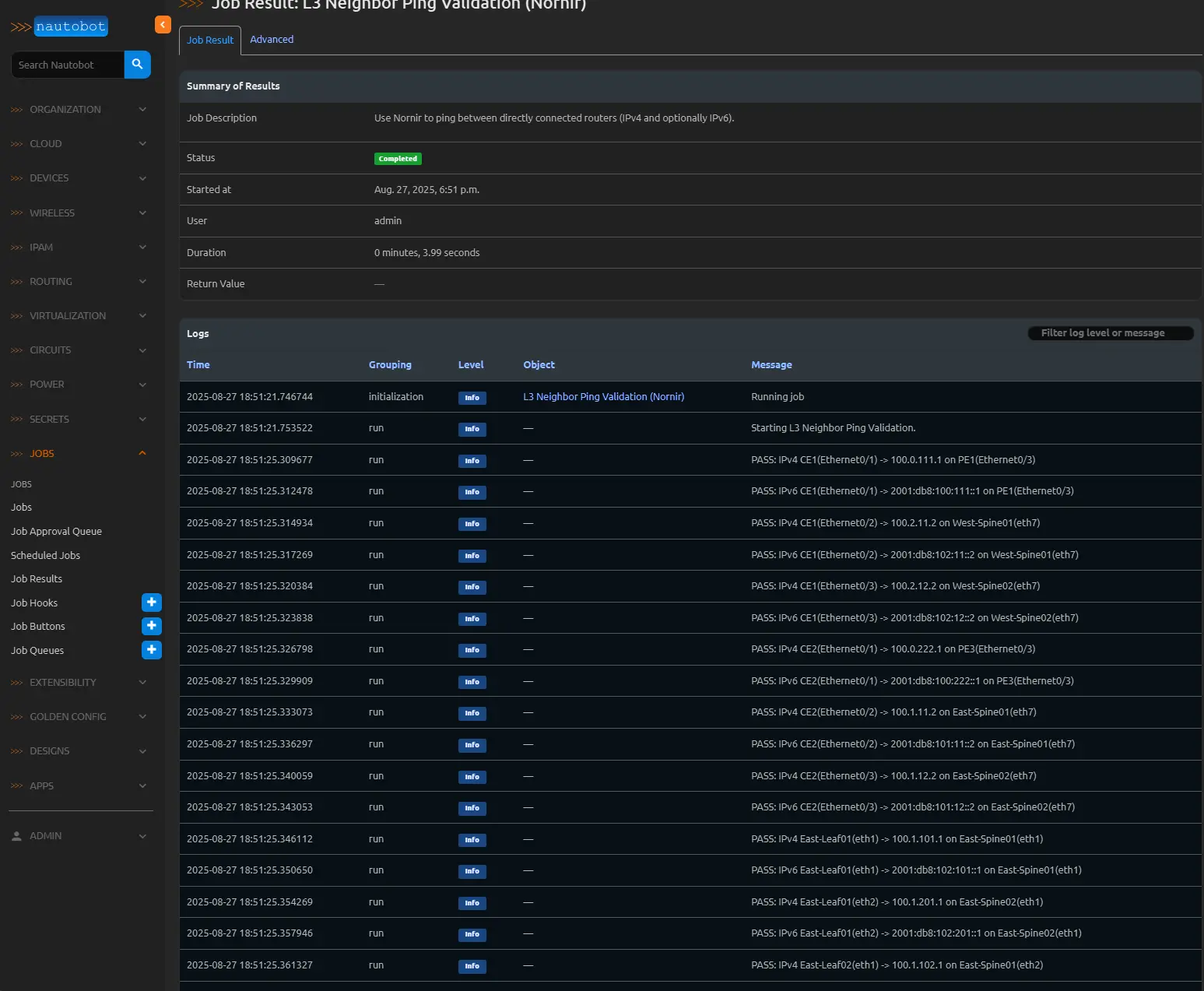
INFO: Starting L3 Neighbor Ping Validation.
INFO: About to run: IPv4 router1(Ethernet1) -> 10.0.0.2 on router2(Ethernet1) | CLI: ping 10.0.0.2 source 10.0.0.1 repeat 3 timeout 2
INFO: Result: IPv4 router1(Ethernet1) -> 10.0.0.2 on router2(Ethernet1) | sent=3 recv=3 loss=0 rtt(ms) min/avg/max=1.2/1.5/1.8
INFO: PASS: IPv4 router1(Ethernet1) -> 10.0.0.2 on router2(Ethernet1)
INFO: Summary: 4/4 tests passed, 0 failed.
 If a test fails:
1
2
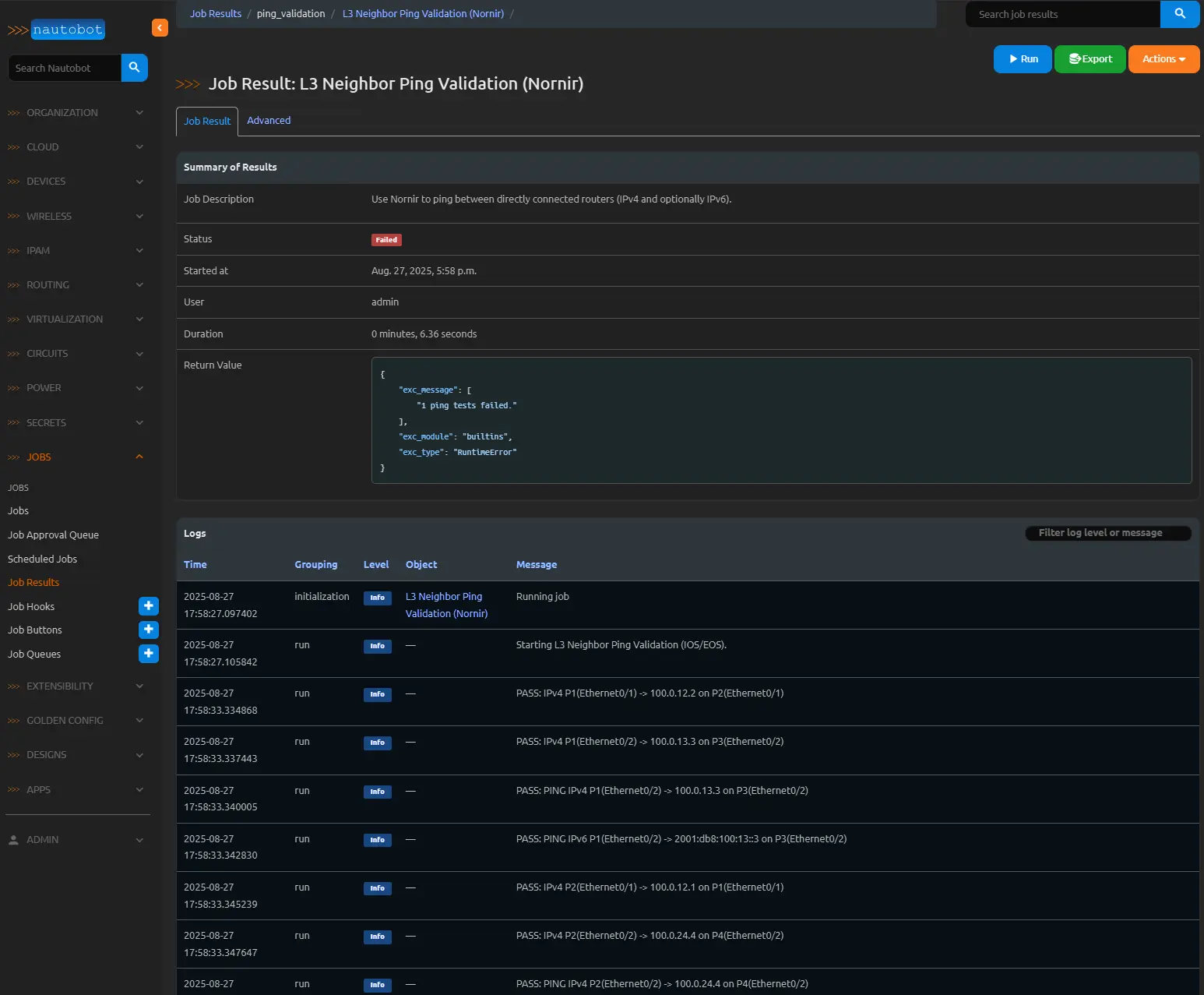
ERROR: FAIL: IPv4 router3(Ethernet2) -> 10.0.1.2 on router4(Ethernet2) - ping result: {'success': {'probes_sent': 3, 'packet_receive': 0, 'packet_loss': 3}}
ERROR: 1 ping tests failed.

Customizing the Job
You can extend this Job to suit your needs:
- Add more validations: Check MTU, VLANs, or BGP sessions using additional NAPALM tasks.
- Enhance logging: Export results to a custom report or integrate with a SIEM.
- Modify filters: Add device type or interface type filters.
- Handle errors gracefully: Add retry logic or skip problematic devices.
- Support other platforms: Extend _approx_cli for other NAPALM drivers (e.g., JunOS).
Best Practices
- Test in a lab: Validate the Job in a non-production environment first.
- Optimize performance: Adjust Nornir’s num_workers based on your environment.
- Secure credentials: Use a secure credentials provider (e.g., HashiCorp Vault) instead of environment variables.
- Document inputs: Clearly describe each input field in the Job’s Meta description or UI help text.
- Monitor failures: Integrate with Nautobot’s logging or external systems to alert on failures.
Conclusion
Writing Nautobot Jobs like L3NeighborPingValidationNornir empowers network engineers to automate configuration validation, leveraging Nautobot’s rich data model and Nornir’s automation capabilities. By systematically testing L3 connectivity, you can catch misconfigurations early, ensure network reliability, and maintain a robust source of truth. Try adapting this Job to your environment, and explore other validation tasks to further automate your network operations.For the full code, refer to the example above, and check out Nautobot’s Jobs documentation and the nautobot-plugin-nornir repository for more details.