Nautobot Workshop Blog Series - Part 10 - Nautobot Golden Configuration - Config Plans and Compliance Remediation

Nautobot Workshop Blog Series - Part 10 - Nautobot Golden Configuration - Config Plans and Compliance Remediation
Advancing Network Assurance: Config Plans and Compliance Remediation in Nautobot’s Golden Config App
In continuation of our exploration into Nautobot’s Golden Config App, where we previously examined the intricacies of configuration compliance, this installment shifts focus to Config Plans and Compliance Remediation. These features extend the app’s capabilities beyond mere detection of discrepancies, enabling proactive deployment of corrective configurations and automated remediation of non-compliant states. By leveraging Config Plans for targeted deployments and Compliance Remediation for intelligent fixes, network practitioners can achieve a more resilient and automated configuration management paradigm, reducing manual intervention and enhancing overall network integrity.
The Role of Config Plans in Configuration Management
Config Plans represent a pivotal mechanism within the Golden Config App, encapsulating sets of configuration commands destined for deployment to network devices. Each plan is intrinsically linked to a singular device, serving as a blueprint for enforcing compliance and implementing changes.
They facilitate a structured approach to configuration deployment, bridging the gap between identified compliance issues and their resolution.Fundamentally, Config Plans are generated from diverse sources, including compliance-derived configurations or manual inputs, and are designed to streamline the process of aligning device states with intended configurations. This not only aids in remediation but also supports broader change management initiatives.
Types of Config Plans and Their Applications
Config Plans are categorized by their source, each tailored to specific use cases:
- Intended Configurations: Derived from compliance features, these plans encapsulate the full desired state for deployment in greenfield scenarios or complete overhauls.
- Missing Configurations: Focus on absent elements flagged during compliance checks, ideal for incrementally adding required settings without disrupting existing configs.
- Remediation Configurations: Automatically generated fixes for discrepancies, directly addressing non-compliance through targeted commands.
- Manual Configurations: User-defined command sets for bespoke changes not captured by automated compliance processes.
These types enable versatile applications, from bulk compliance enforcement across sites to precise, ticket-associated updates, ensuring controlled and traceable modifications.
Compliance Remediation: Automating Configuration Corrections
Compliance Remediation elevates the Golden Config App by automating the generation of corrective configurations based on compliance analyses. It utilizes data from intended, missing, and extra configurations to produce a “Remediating Configuration” that restores devices to compliant states, thereby minimizing errors, bolstering security, and ensuring adherence to standards.
This feature operates agnostically across platforms, generating remediation data during compliance jobs and presenting it in detailed views for validation.
Setting Up and Enabling Remediation
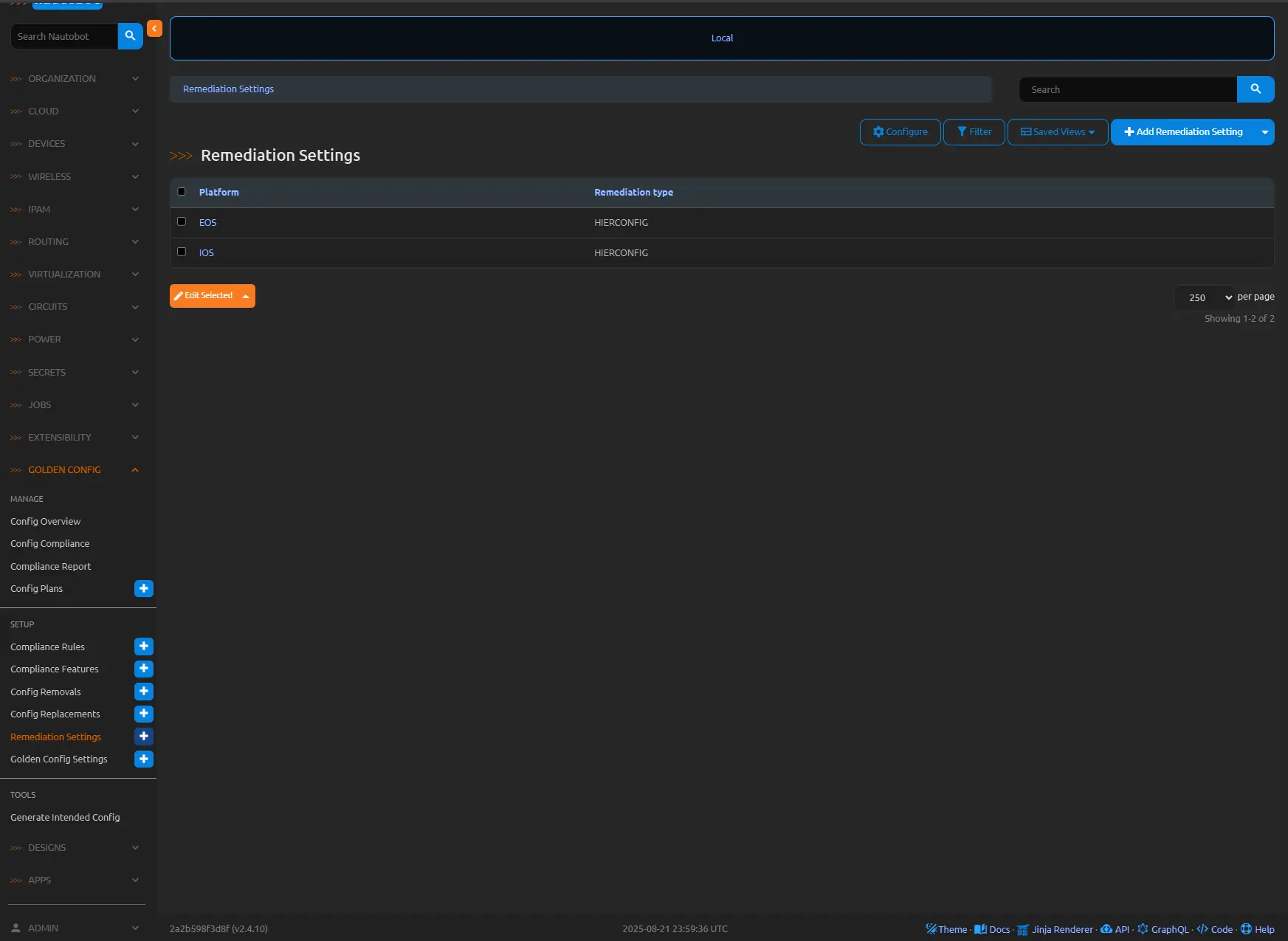
Configuration begins at Golden Config → Remediation Settings, where platforms are assigned remediation types:
- HIERCONFIG Remediation: Suited for CLI-based systems (e.g., Cisco IOS, Arista EOS), it parses hierarchical configs to derive precise remediation steps using the Hier Config library.
- Custom Remediation: For non-CLI or JSON formats, users define Python functions in nautobot_config.py to process compliance objects and incorporate external data.
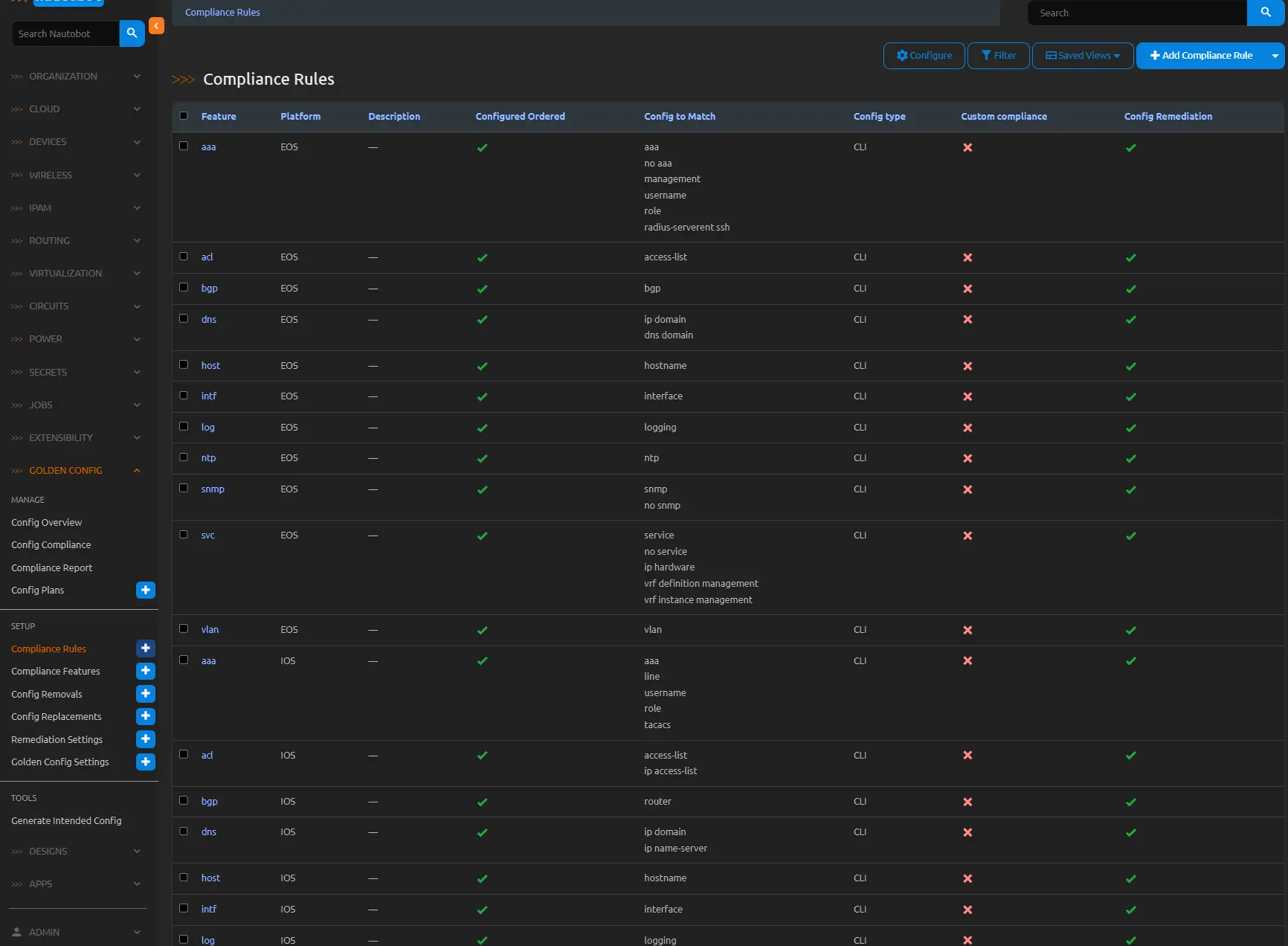
Enablement is per-rule via Golden Config → Compliance Rules, by selecting the “Enable Remediation” checkbox for supported platforms. Execution via the Perform Configuration Compliance job populates remediation fields, viewable under Golden Config → Config Compliance for the device and feature.
Best Practices and Insights from Implementation
- Incremental Adoption: Start with HIERCONFIG for standard platforms before venturing into custom functions.
- Validation Prior to Deployment: Leverage post-processing in Config Plans to render and review configs before approval.
- Integration with Change Controls: Utilize ID/URL fields for seamless alignment with ITSM processes.
- Automated Scheduling: Incorporate remediation jobs into routine pipelines to proactively mitigate drifts.
- Error Differentiation: Distinguish between true issues and parsing artifacts during remediation reviews.
- Scalability Considerations: Test in lab environments, especially for custom remediations involving external data.
Illustrative Remediation Scenarios
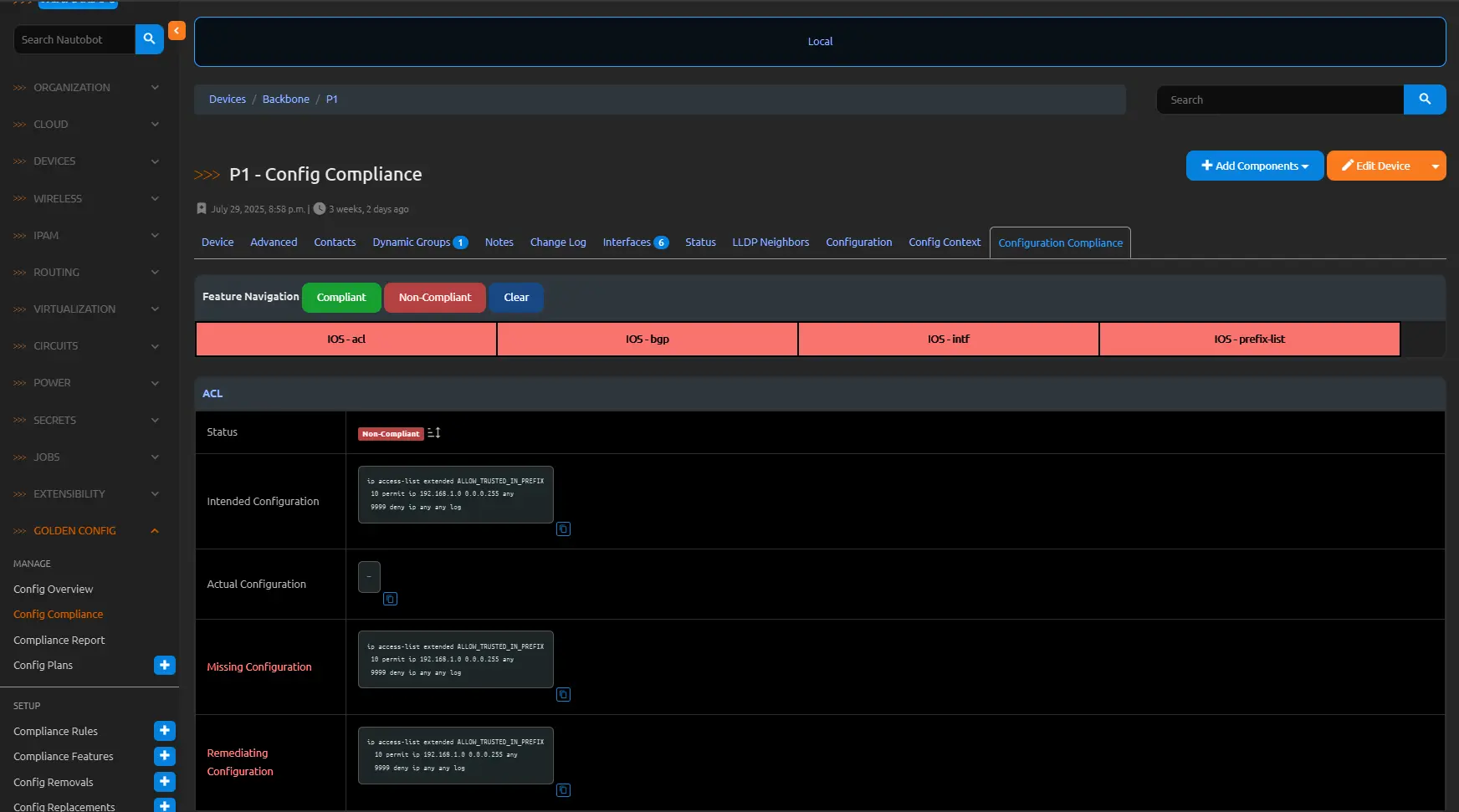
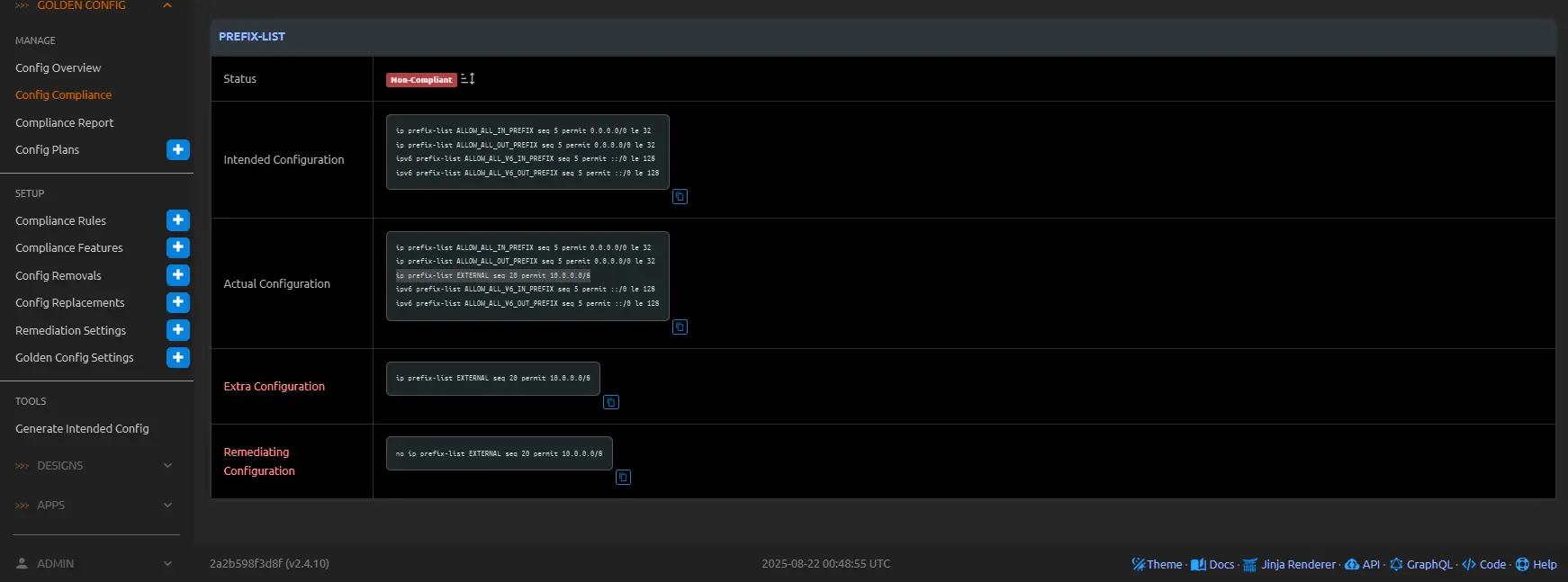
Consider a scenario where a compliance job identifies missing entries in an Access Control List (ACL) and extraneous prefix lists on a Cisco router. For instance, the intended configuration mandates specific ACL rules for ingress traffic filtering (e.g., permitting trusted subnets while denying others) and precise prefix lists for route advertisement control, but the actual running config omits key ACL permits and retains legacy prefix-list sequences from deprecated policies. Enabling remediation for the relevant rules—such as those defined for ACL and Prefix List compliance features—generates a Config Plan with targeted commands: adding the absent ACL entries (e.g., access-list 101 permit ip 192.168.1.0 0.0.0.255 any) and removing the superfluous prefix-list lines (e.g., no ip prefix-list EXTERNAL seq 20 permit 10.0.0.0/8). Viewing the plan reveals the config set, post-processed for secrets if applicable, ready for approval and deployment.
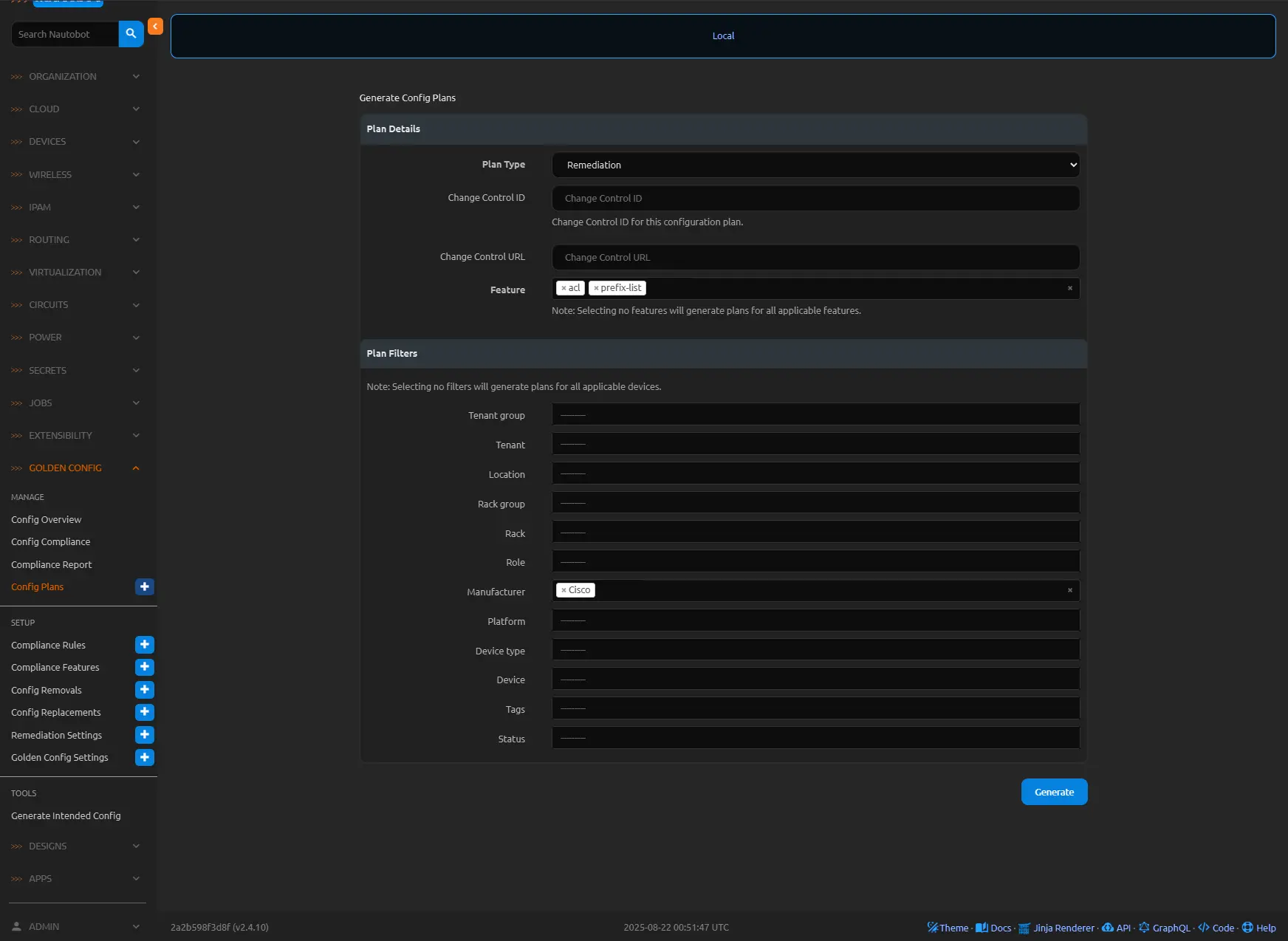
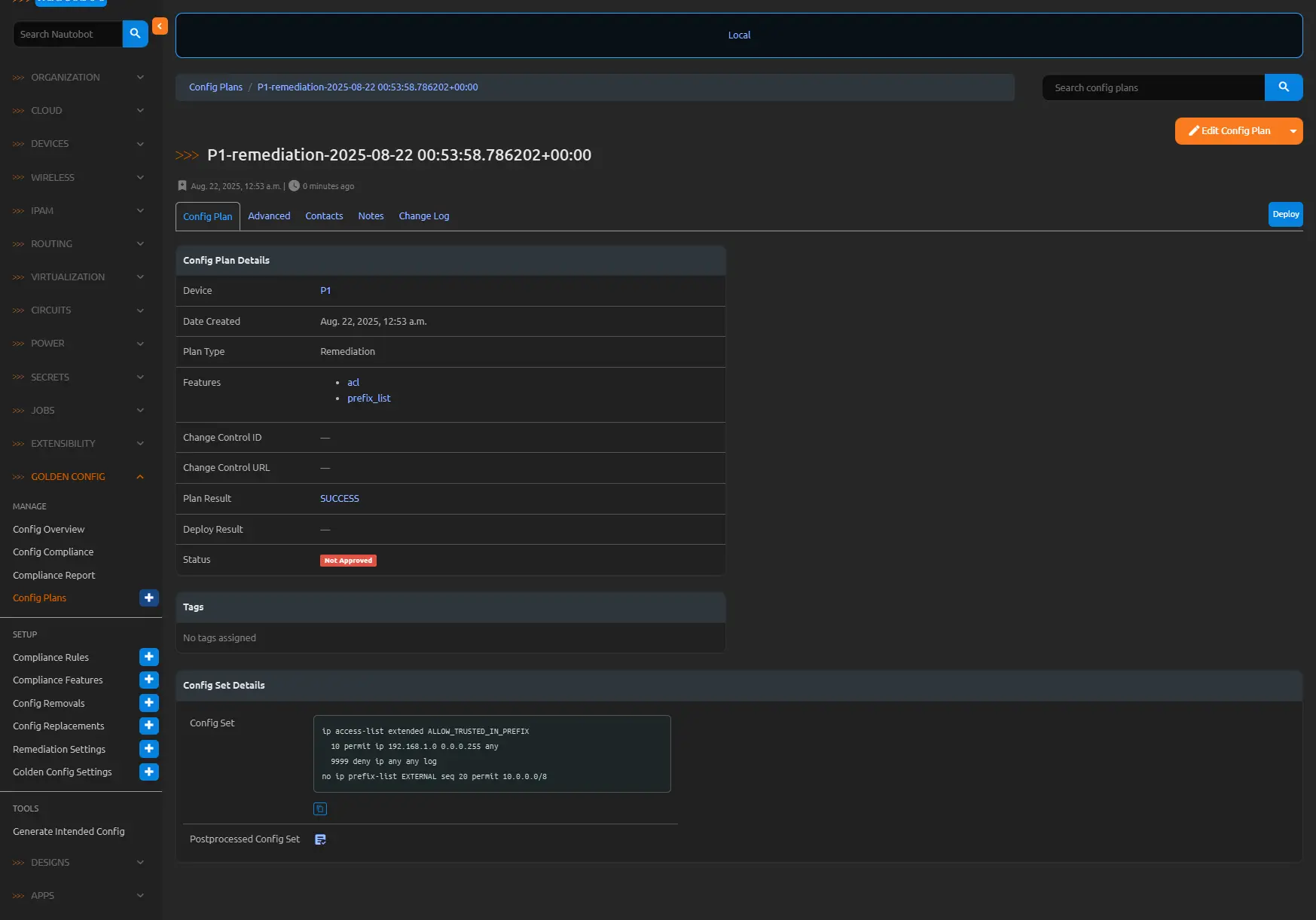
Current running config on router P1:
1
2
3
4
5
6
7
8
9
10
11
12
13
14
15
16
17
18
19
20
21
22
23
24
25
26
27
28
29
30
31
32
33
34
35
36
37
38
39
40
41
42
43
44
45
46
47
48
49
50
51
52
53
54
ip http server
ip http secure-server
ip route vrf clab-mgmt 0.0.0.0 0.0.0.0 Ethernet0/0 192.168.220.1
ip ssh bulk-mode 131072
ip scp server enable
!
ip prefix-list ALLOW_ALL_IN_PREFIX seq 5 permit 0.0.0.0/0 le 32
!
ip prefix-list ALLOW_ALL_OUT_PREFIX seq 5 permit 0.0.0.0/0 le 32
!
ip prefix-list EXTERNAL seq 20 permit 10.0.0.0/8
ipv6 route vrf clab-mgmt ::/0 Ethernet0/0
ipv6 router ospf 1
 router-id 100.0.254.1
 passive-interface Loopback0
!
!
!
ipv6 prefix-list ALLOW_ALL_V6_IN_PREFIX seq 5 permit ::/0 le 128
!
ipv6 prefix-list ALLOW_ALL_V6_OUT_PREFIX seq 5 permit ::/0 le 128
route-map ALLOW_ALL_V6_IN permit 10
 match ip address prefix-list ALLOW_ALL_V6_IN_PREFIX
!
route-map ALLOW_ALL_V6_OUT permit 10
 match ip address prefix-list ALLOW_ALL_V6_OUT_PREFIX
!
route-map ALLOW_ALL_V4_OUT permit 10
 match ip address prefix-list ALLOW_ALL_OUT_PREFIX
!
route-map ALLOW_ALL_V4_IN permit 10
 match ip address prefix-list ALLOW_ALL_IN_PREFIX
!
mpls ldp router-id Loopback0 force
!
!
!
control-plane
!
!
!
line con 0
 logging synchronous
line aux 0
line vty 0 4
 login local
 transport input ssh
!
!
!
!
end

P1#
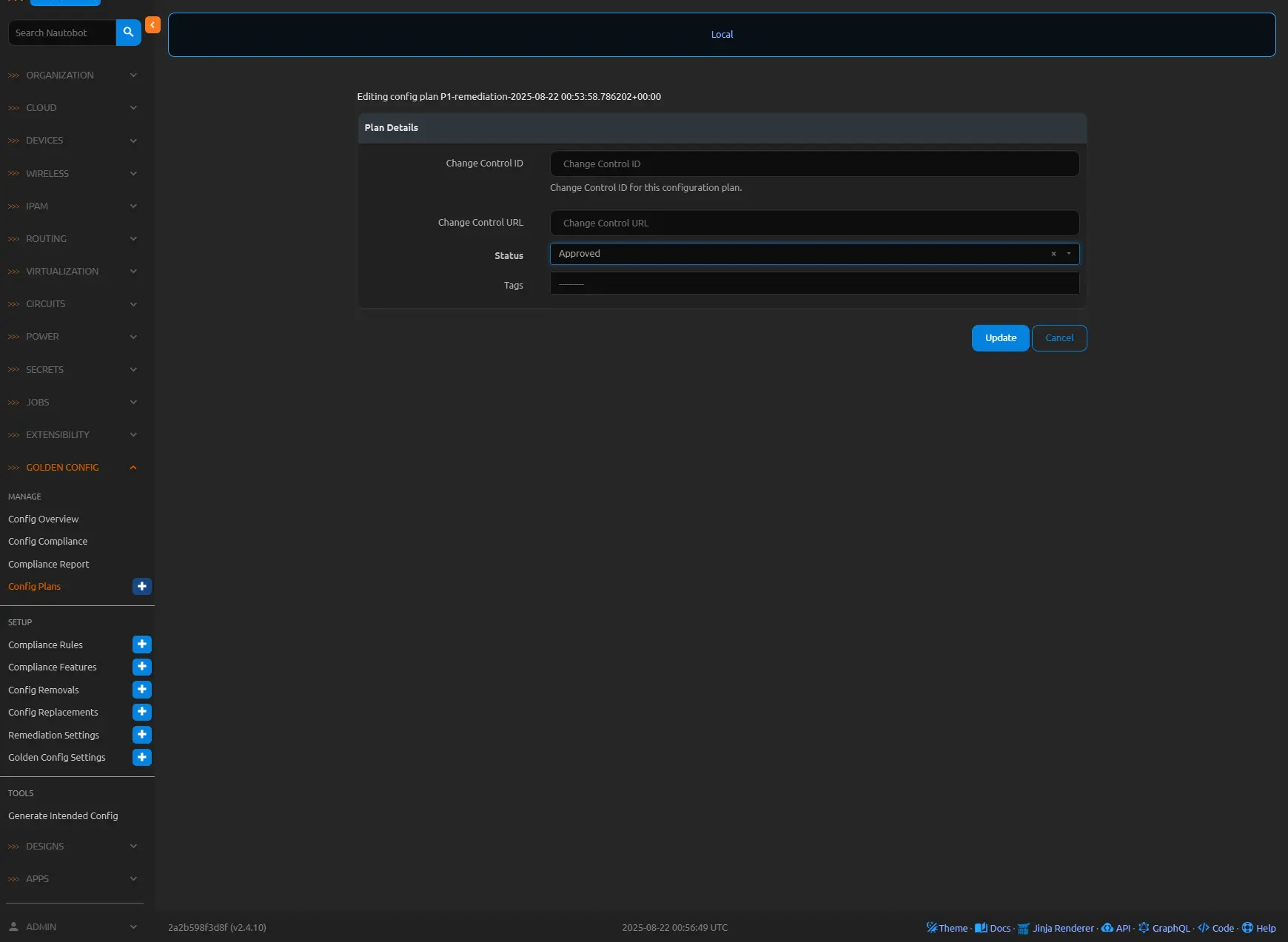
I will change the status of this config plan to Approved and then deploy.
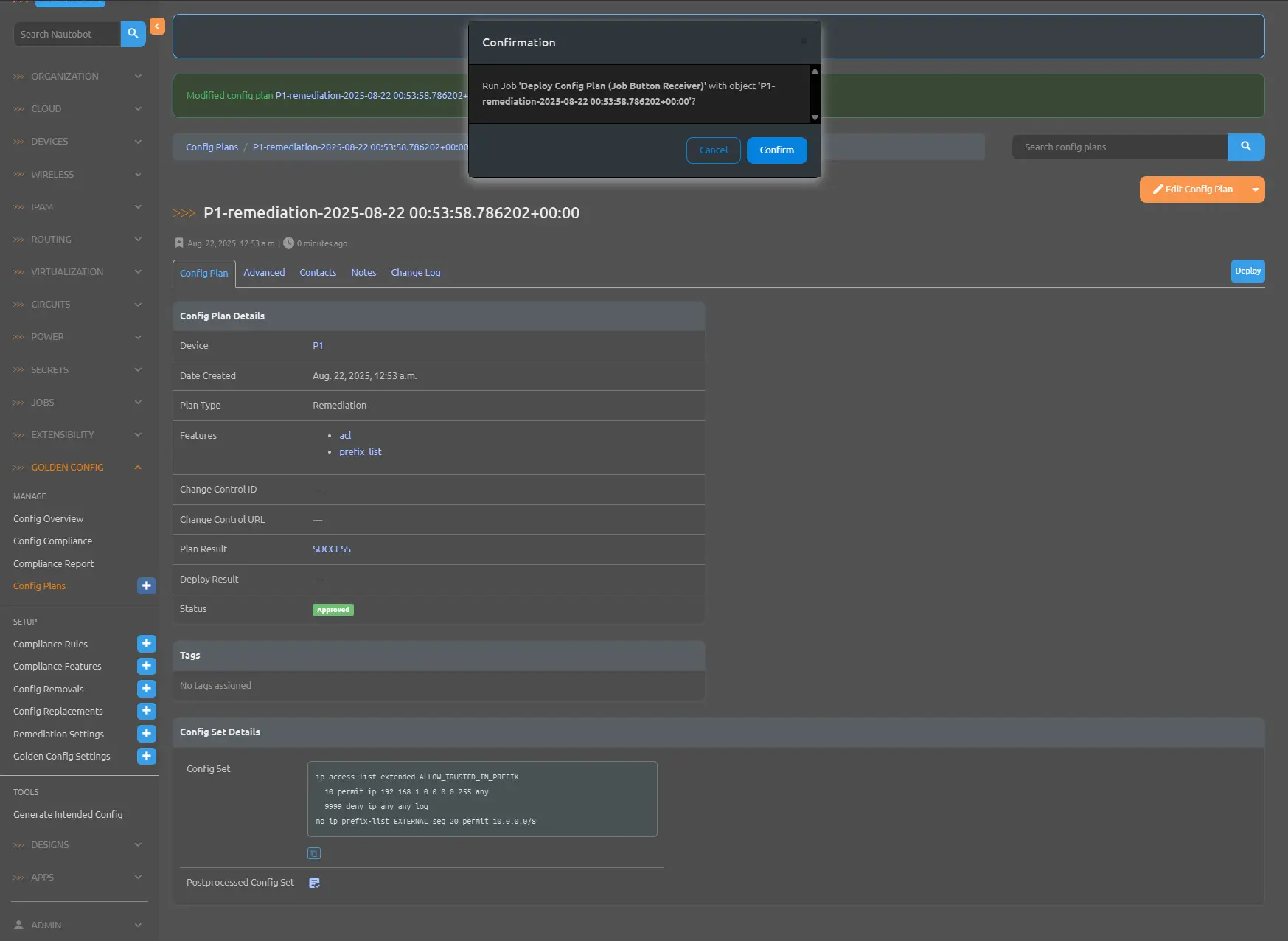
Then we will click the deploy button to push the config set to the P1 router.
Here is the post deployed configuration, notice in the output below we have the access list added and the EXTERNAL prefix list has been removed.
1
2
3
4
5
6
7
8
9
10
11
12
13
14
15
16
17
18
19
20
21
22
23
24
25
26
27
28
29
30
31
32
33
34
35
36
37
38
39
40
41
42
43
44
45
46
47
48
49
50
51
52
53
54
55
ip http server
ip http secure-server
ip route vrf clab-mgmt 0.0.0.0 0.0.0.0 Ethernet0/0 192.168.220.1
ip ssh bulk-mode 131072
ip scp server enable
!
ip access-list extended ALLOW_TRUSTED_IN_PREFIX
 10 permit ip 192.168.1.0 0.0.0.255 any
 9999 deny ip any any log
!
!
ip prefix-list ALLOW_ALL_IN_PREFIX seq 5 permit 0.0.0.0/0 le 32
!
ip prefix-list ALLOW_ALL_OUT_PREFIX seq 5 permit 0.0.0.0/0 le 32
ipv6 route vrf clab-mgmt ::/0 Ethernet0/0
ipv6 router ospf 1
 router-id 100.0.254.1
 passive-interface Loopback0
!
!
!
ipv6 prefix-list ALLOW_ALL_V6_IN_PREFIX seq 5 permit ::/0 le 128
!
ipv6 prefix-list ALLOW_ALL_V6_OUT_PREFIX seq 5 permit ::/0 le 128
route-map ALLOW_ALL_V6_IN permit 10
 match ip address prefix-list ALLOW_ALL_V6_IN_PREFIX
!
route-map ALLOW_ALL_V6_OUT permit 10
 match ip address prefix-list ALLOW_ALL_V6_OUT_PREFIX
!
route-map ALLOW_ALL_V4_OUT permit 10
 match ip address prefix-list ALLOW_ALL_OUT_PREFIX
!
route-map ALLOW_ALL_V4_IN permit 10
 match ip address prefix-list ALLOW_ALL_IN_PREFIX
!
mpls ldp router-id Loopback0 force
!
!
!
control-plane
!
!
!
line con 0
 logging synchronous
line aux 0
line vty 0 4
 login local
 transport input ssh
!
!
!
!
end
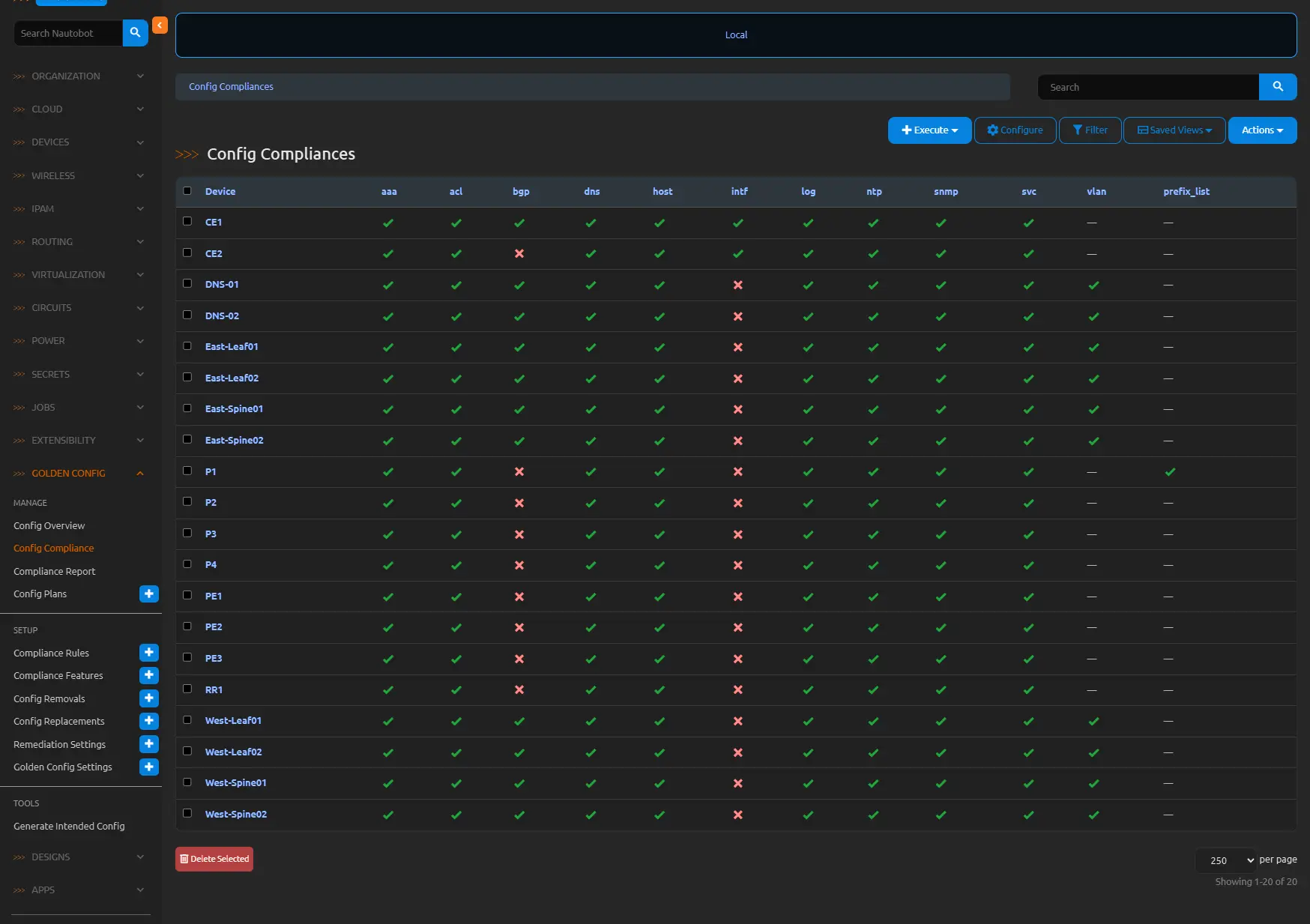
After re-running the compliance check, P1 now shows the ACL and the prefix lists in compliance—all accomplished without logging into the router or typing a single character, demonstrating the transformative power of Nautobot’s automated remediation in streamlining network operations and eliminating manual drudgery.
Integrating Config Plans and Remediation into NetDevOps Pipelines
These features serve as integral components in NetDevOps workflows, enabling automated deployment gates, notification triggers on remediation generation, and correlation with audit logs. By embedding Config Plans in CI/CD pipelines and linking remediation to compliance thresholds, organizations can orchestrate end-to-end configuration lifecycle management.
Conclusion
Config Plans and Compliance Remediation in Nautobot’s Golden Config App transform configuration management from a reactive to a proactive discipline, empowering automated corrections and deployments with precision and traceability. Through meticulous setup and strategic integration, these tools fortify network operations against drifts and inefficiencies.